A DM says my account will be deleted. What should I click?
The short answer
This is a typical attempt to steal access. Meta warns about messages that invoke rule violations and request login details.
What this answer is based onWhat to do
Don’t send your password or code. Open Instagram independently and check platform notices and emails in settings. Report the suspicious message. If you already shared login details, change your password immediately and check active logins.
- Do not give the sender your password, verification codes or backup codes.
- Open Instagram yourself and check available notices without following the supplied link.
- If you already shared details, change your password and review logins; if access is lost, use official recovery.
If the message arrived by email
Compare the full sender addresses. To verify a message, open Instagram directly, without its link.
Illustrative diagram, not a screenshot Setting names and positions in the app may differ. Source for this explanation
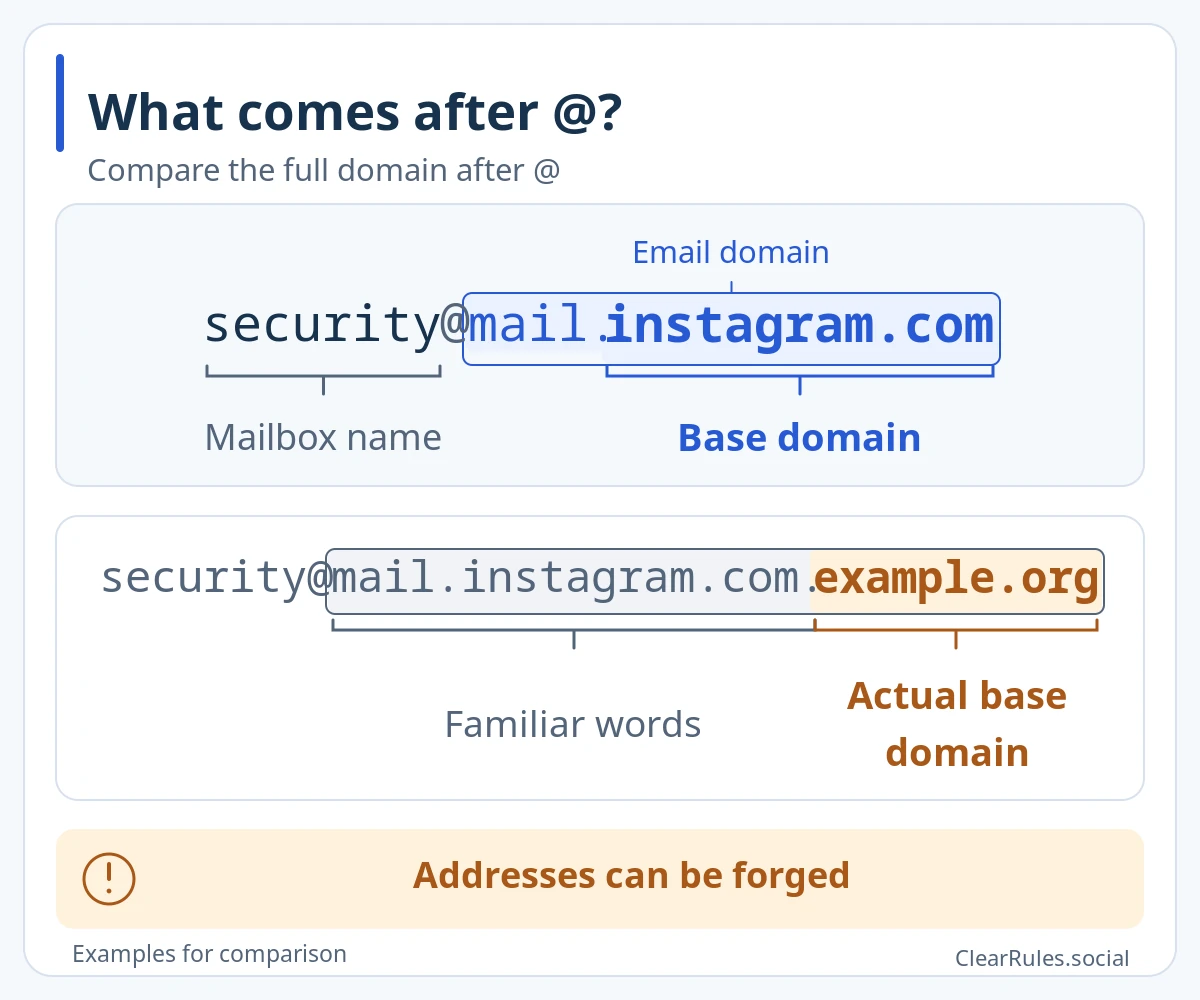
Compare the complete domain with the official list, not just the familiar words.
The displayed sender address can be forged. To verify, open Instagram yourself and check recent emails. The domain example.org is reserved for examples.Enlarge diagramThe list covers the last 14 days. A missing entry alone does not prove fraud.
What else you can do
Choose an option that fits your circumstances.
Report an Instagram message
A DM contains a suspicious link, a threat or a fake support message.
For a message you can access in the Instagram app.
How to contact them and what to prepare
Have these ready
The message and sender’s username. If you need to preserve a threat, do so before deleting the conversation.
What to do
- Open the conversation and press and hold the specific message.
- Tap Report and choose the matching reason. Do not open a suspicious link to test it.
m.facebook.com · New tab
If it does not work
If the button is missing, save the exact notice and check the same account in the app and a browser. Use Report a problem for a broken interface; it does not replace an appeal.
Source and what we checked
Purpose of this contact option checked: . An official page excerpt was available in search; the full text was not reviewed.
Submission was not tested. Availability for your account and an outcome are not guaranteed.
Official Meta sourceThe situation
An account named “Instagram Support” messages you: “Violation detected. Send your password and SMS code within 15 minutes or your account will be deleted.”
What this answer is based on
Meta · Keeping Instagram Safe and Secureabout.fb.comGuide based on Meta’s materialReview details
Source reviewed:
We read the official source listed for this topic. Other Meta rules are reviewed separately.
Primary source reread: . This does not mean every supplementary source, translation or app screen was rechecked.
Material published: July 13, 2021
Include the guide link, language and wording that needs checking. Add an official source link if you have one. Do not send passwords, login codes or photos of identity documents.
Examples are made up to explain the guidance. Meta decides individual account and content cases.
Study this topic“Support” wants an urgent replySources and related topicsPolicy Graph · Demo in development